The KNIME ecosystem, as an API
Search and look up nodes, categories, extensions, workflows, and products — the same data as on NodePit, one HTTP request away.
{
  "items": [
    {
      "name": "Render QR Code",
      "nodePitId": "io.qrocodile.api.operation.renderqrcode.RenderQrCodeNodeFactory",
      "url": "https://nodepit.com/node/io.qrocodile.api.operation.renderqrcode.RenderQrCodeNodeFactory",
      "kind": "node",
      "iconSrc": "data:image/png;base64,iVBORw0K…"
    },
    {
      "name": "QR Code Designer",
      "nodePitId": "io.qrocodile.api.designer.node.QrDesignerNodeFactory",
      "url": "https://nodepit.com/node/io.qrocodile.api.designer.node.QrDesignerNodeFactory",
      "kind": "node",
      "iconSrc": "data:image/png;base64,iVBORw0K…"
    },
    {
      "name": "QR Code Generator",
      "nodePitId": "io.qrocodile.api.designer.node.QrGeneratorNodeFactory",
      "url": "https://nodepit.com/node/io.qrocodile.api.designer.node.QrGeneratorNodeFactory",
      "kind": "node",
      "iconSrc": "data:image/png;base64,iVBORw0K…"
    }
  ]
}What Is Inside
Pick a card to send the request in the box above.
Get Started
Search by name, then use the nodePitId of a hit to look it up. That is all there is to the basics.
- Every search hit carries its
nodePitIdand a link to its page. - Node IDs contain dots and slashes, so encode them in a URL.
- Add
knimeVersionto see an item as of that KNIME version.
curl "https://nodepit.com/api/search?query=qr%20code&kind=node&limit=3"const response = await fetch('https://nodepit.com/api/search?query=qr%20code&kind=node&limit=3');
const { items } = await response.json();
for (const item of items) console.log(item.name, item.url);import requests
response = requests.get('https://nodepit.com/api/search', params={'query': 'qr code', 'kind': 'node', 'limit': 3})
for item in response.json()['items']:
print(item['name'], item['url'])curl "https://nodepit.com/api/nodes/io.qrocodile.api.designer.node.QrDesignerNodeFactory"const id = encodeURIComponent('io.qrocodile.api.designer.node.QrDesignerNodeFactory');
const node = await (await fetch(`https://nodepit.com/api/nodes/${id}`)).json();
console.log(node.name, node.description);import requests
node = requests.get('https://nodepit.com/api/nodes/io.qrocodile.api.designer.node.QrDesignerNodeFactory').json()
print(node['name'], node['description'])Good to Know
Open
No key, no signup. Optionally send Basic authentication with your NodePit account.
Versioned
Pass knimeVersion, e.g. 5.12, to see what a KNIME version offers.
Node Images
The icon or figure of any node as SVG or PNG, ready to embed.
Always Current
The data behind nodepit.com itself, not a snapshot that goes stale.
AI-Ready
Prefer a chat? The MCP server offers the same data to your assistant.
OpenAPI
Generate a client for your language from the OpenAPI document.
Endpoints
All of them are GET. Parameters, schemas, and responses are in the API reference.
/api/searchSearch by name across nodes, categories, extensions, workflows, products, and users./api/nodesList all nodes, paginated and optionally for one KNIME version./api/nodes/{nodePitId}A node in detail: description, ports, options, extension, and its popular predecessors and successors./api/nodes/{nodePitId}/imageThe node icon or figure as SVG or PNG./api/categoriesList the node categories./api/categories/{nodePitId}A category: its description, the categories above it, and the extension which provides it./api/features/{nodePitId}An extension (a.k.a. feature) and the update site to install it from./api/workflowsList public workflows and components./api/workflows/{nodePitId}A workflow in detail: the nodes it uses, annotations, and a download link./api/productsList the products, i.e. the extensions of vendors listed on NodePit./api/products/{nodePitId}A product with its latest version, download count, and extensions./api/versionsThe released KNIME versions, optionally filtered by operating system and architecture.Use It in Your Workflows
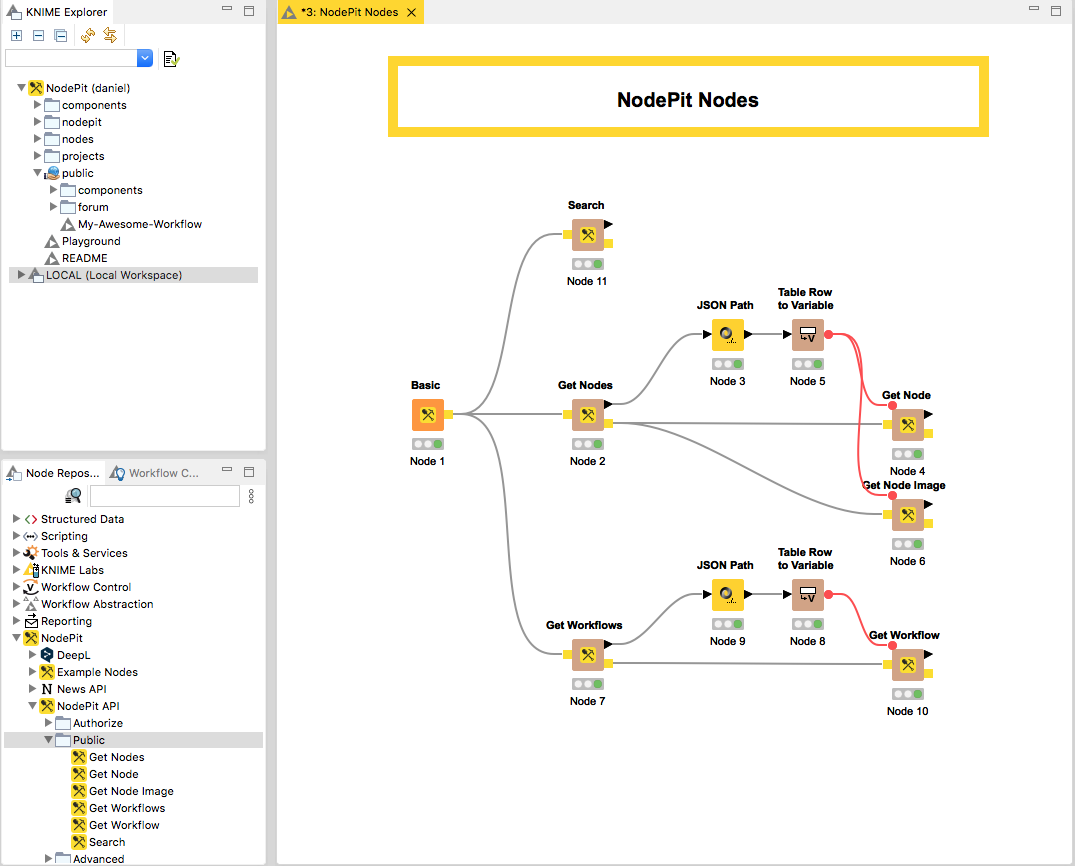
Working in KNIME? NodePit for KNIME has nodes for this API, so you can use it in a workflow without writing code.
Frequently Asked Questions
No. The API is open: there is nothing to sign up for, and nothing to send. If you want to, you can identify yourself with HTTP Basic authentication using your NodePit account.
Yes: 60 requests per minute and client, 30 of them for search, and 20 for the images of nodes. Every answer says where you stand, in X-RateLimit-Limit, X-RateLimit-Remaining, and X-RateLimit-Reset (seconds until the allowance is full again). Beyond the limit, the API answers with status 429 and a Retry-After header. This is a small service run by two people: please cache what you fetch, do not crawl it, and get in touch if you plan something big.
The identifier of an item. For a node, it is the class name of its factory (e.g. io.qrocodile.api.designer.node.QrDesignerNodeFactory), for a category its path (/io/read), for a workflow its path on the server it lives on. /api/search returns it with every hit. Encode it for use in a URL.
Yes, most endpoints take a knimeVersion parameter such as 5.12. Without it, you get the latest one. /api/versions lists what exists.
At https://nodepit.com/api/docs/json. The interactive reference is at https://nodepit.com/api/docs.
Use the feedback form. It reaches the people who run NodePit, and you get an answer by email.
It can, without you writing any code: the NodePit MCP server offers the same data to Claude, ChatGPT, Cursor, and other assistants.
Yes. NodePit for KNIME has nodes for the API, so you can use it in a workflow without writing code.
Rather Talk to It?
The NodePit MCP server gives your AI assistant the same data. Nothing to code.